Discord Invisible Name Copy Paste
Try blank-looking characters for a Discord display name or server nickname. Copy a character below and test it in the field you want to change. Discord may reject it; this tool does not guarantee an invisible username.
Blank Discord Name Generator
Click any button below to copy an invisible character for Discord. If one option does not work, try another Unicode blank character because Discord and other platforms may treat invisible characters differently.
Click any button to copy a Discord invisible name.
Preview will appear here. The copied text may look empty because it is invisible.Test Your Invisible Discord Name
Paste your copied invisible character below to check if the blank text was copied.
0 character(s)
Quick Answer: How to Get an Invisible Name on Discord
Copy an invisible character from the tool above, open Discord, go to your profile or server nickname settings, paste the blank character into the name field, and save it. If Discord blocks one character, try the Braille Blank, Hangul Filler or Zero Width Space option.
What Is a Discord Invisible Name?
A Discord invisible name is a blank-looking name created with a special Unicode character. It looks empty on screen, but it is not actually empty. The invisible character is still present in the text field, which is why some apps may accept it where a normal blank space is not allowed.
Many users search for Discord invisible name copy paste because they want a cleaner profile, a hidden-looking nickname, a blank username style or an empty separator in chat. This tool helps you copy invisible characters quickly without searching through Unicode tables or testing random symbols manually.
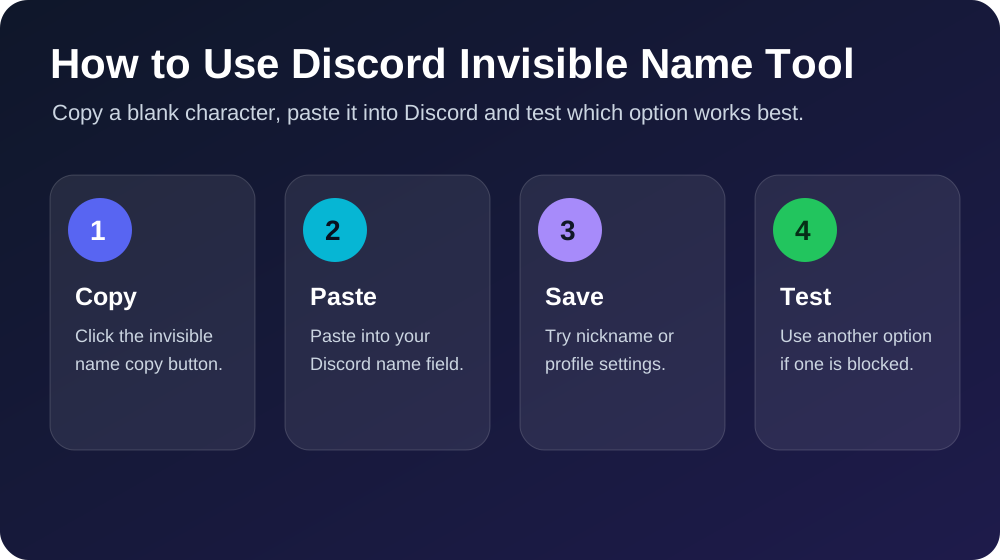
How to Use This Discord Invisible Name Generator
Using the blank Discord name generator is simple. Choose one of the copy buttons above, paste the invisible character into Discord, and test if it works. The first option uses Hangul Filler, which often works well for blank-looking names. The second option uses Braille Blank, which also creates a visible empty space. The Zero Width Space and ZWNJ options are more hidden and may work better for invisible separators.
If you want a longer invisible username or blank message, use the custom generator. Enter the number of blank characters you want and click generate. The tool will create a longer invisible text string and copy it for you.
Blank Discord Name Copy Paste
A blank Discord name can make your profile look minimal and different. However, Discord may update how usernames and nicknames work over time, so one invisible character may work in some fields but not in others. That is why this page gives you multiple blank character options. If the first blank name is rejected, copy another invisible character and try again.
You can also use invisible characters in server nicknames, profile formatting, messages or spacing. Always use them responsibly. Do not use invisible names to impersonate other users, avoid moderation, or create confusion in servers.
Invisible Discord Username vs Server Nickname
Discord usernames and server nicknames may behave differently. Your main account username can have stricter rules, while server nicknames may allow more flexibility depending on server settings and Discord updates. If a blank username does not work, try using the invisible character in your server nickname instead.
For best results, test the copied invisible name in the box above first, then paste it into Discord. If you can paste it into the test box and the character count changes, the invisible text was copied correctly.
For Discord Names
Copy blank names and invisible usernames for Discord profile and nickname fields.
For Discord Messages
Use invisible characters to create blank messages or hidden spacing in chats.
For Gaming Profiles
Try invisible names for games, communities and online profiles where supported.
Why Some Invisible Names Do Not Work
Not every platform accepts every Unicode character. Discord may block certain invisible characters in usernames, while still allowing them in messages or nicknames. Some characters also look blank but have different widths. Hangul Filler and Braille Blank usually create a visible blank space, while Zero Width Space is truly hidden and may not create visible spacing.
If your invisible Discord name does not save, try another option from this tool. You can also test shorter or longer blank names using the custom generator. The goal is to find the invisible character that Discord accepts in the field you are editing.
Related Free Tools
Frequently Asked Questions
Can I make my Discord name invisible?
You can try using an invisible Unicode character as your Discord name or server nickname. Some fields may accept it, while others may block it depending on Discord rules and updates.
What is the best invisible character for Discord?
Start with Hangul Filler or Braille Blank. If those do not work, try Zero Width Space or Zero Width Non-Joiner from the tool above.
Can I copy a blank Discord name from this page?
Yes. Click any copy button above to copy a blank Discord name or invisible character instantly.
Why is my blank Discord name not working?
Discord may block certain invisible characters in some fields. Try another Unicode option or use it as a server nickname instead of your main username.
Is using an invisible Discord name safe?
Using invisible text for formatting is generally harmless, but you should avoid impersonation, spam, or anything that violates Discord server rules.
Final Thoughts
This Discord invisible name copy paste tool is built for users who want a quick way to copy blank names, invisible usernames, empty characters and invisible spaces. Try the different copy options, test the blank text, and use the one that works best for Discord, messages, usernames or gaming profiles.